I had put a link to a Twitter account here ... but I'm going to be pursuing a different strategy, working with NI's existing social media team.
So if you read this post earlier ... never mind! :-)
January 18, 2012

April 1, 2011
Entering Edits
Hello Internet-land, it's been awhile since I posted here. But I work on inspiration, and lately there hasn't been much of that driving any blog posts.
I've been at NI for over six years now (crazy to think I've been writing this blog for like five of those years) and think I know pretty darn well how to write effective end-user documentation. Plus, I'm human and have an ego. Put these two facts together and when I get edits on my documentation, my first instinct is to bristle and say "Hey, the way I wrote it is best!" (Unless of course it's a typo or misspelling.)
But that attitude cuts off all possibility of improvement and change, especially as we in the group put our brains together on the topic and arrive at more effective documentation strategies, and especially as we branch out into different industries with established terminologies. So even though it takes a bit of effort, as an established technical writer, to say "Here's my best work; tell me what's wrong with it!" -- that is how I want to be, both in this workplace and in life, remaining open to the possibility that there's always a better way and that I don't know what it is.
I've been at NI for over six years now (crazy to think I've been writing this blog for like five of those years) and think I know pretty darn well how to write effective end-user documentation. Plus, I'm human and have an ego. Put these two facts together and when I get edits on my documentation, my first instinct is to bristle and say "Hey, the way I wrote it is best!" (Unless of course it's a typo or misspelling.)
But that attitude cuts off all possibility of improvement and change, especially as we in the group put our brains together on the topic and arrive at more effective documentation strategies, and especially as we branch out into different industries with established terminologies. So even though it takes a bit of effort, as an established technical writer, to say "Here's my best work; tell me what's wrong with it!" -- that is how I want to be, both in this workplace and in life, remaining open to the possibility that there's always a better way and that I don't know what it is.
September 28, 2010
Customer's Language Redux
I've talked here before about speaking the customer's language. Yesterday I saw a post from another technical writing blog that reinforces this point. I quote:
===
....[A] user may want to send a letter to many different people. If the user doesn't know about the mail merge feature, they will insanely copy and paste all the letters.
Having an index entry of mail merge is useless, because if the user doesn't about this feature, they can't look it up! However, having these index entries could help:
Yes, these are long index entries, but so what? A good index attempts to anticipate all the strange and wonderful ways a user might look up a topic.
The mail merge topic itself has to clearly explain why doing a mail merge is better than copying and pasting, because if the user cannot see the benefit of what you are suggesting, they won't do it.
===
"strange and wonderful" ... exactly :-)
===
....[A] user may want to send a letter to many different people. If the user doesn't know about the mail merge feature, they will insanely copy and paste all the letters.
Having an index entry of mail merge is useless, because if the user doesn't about this feature, they can't look it up! However, having these index entries could help:
- distributing a letter to many recipients
- letters, sending a letter to many recipients
- mailing a letter to many recipients
- mass mailings, sending
- recipients, sending a letter to
- same letter, sending to many recipients
- sending a letter to many recipients
Yes, these are long index entries, but so what? A good index attempts to anticipate all the strange and wonderful ways a user might look up a topic.
The mail merge topic itself has to clearly explain why doing a mail merge is better than copying and pasting, because if the user cannot see the benefit of what you are suggesting, they won't do it.
===
"strange and wonderful" ... exactly :-)
July 30, 2010
Designing for your Audience
Today's xkcd (a fantastically geeky webcomic) is about designing for your audience ...
http://xkcd.com/773/
The parallels to technical writing are obvious :-) How can you know what to write if you don't know what information your audience is looking for?
http://xkcd.com/773/
The parallels to technical writing are obvious :-) How can you know what to write if you don't know what information your audience is looking for?
May 25, 2010
I Don't Want You to Think

One of my guiding principles behind writing & reviewing technical documentation is "Remove the burden of thought from the customer." After all, our customers are NOT getting paid to read documentation. They're not even getting paid to figure out how to program in LabVIEW. They are getting paid to solve problems.
So when I'm writing or reviewing technical documentation, I think to myself: how hard would a customer have to think in order to decipher this documentation? Hopefully the answer is "not very hard" because time spent deciphering the documentation is time not spent curing cancer, controlling photon beams, developing alternative-fuel technologies, monitoring structural health, and so on. But if that's not the answer I get when I look at the documentation, I have a number of ways to bring the effort level down.
- Speak your language. This one is difficult to do because the first people to define terms are the engineers who write a feature specification. As such, they define the language implicitly when talking about their feature, so because we use those specs as basis for documentation, we often repeat their language and incorporate it into headings. But we shouldn't. Compare "Using the Throughput Control" with "Achieving High Throughput". Which heading are you more likely to notice? I'd bet it's the one that speaks more to the task you want to do than the feature we are providing.
- Use pictures for visual products (like LabVIEW). Pictures improve a reader's ability to scan the text instead of requiring them to read a bunch of steps, provide anchors on the page that serve as reference points when switching back and forth between windows, and make the help look more colorful and less intimidating.
- Provide examples. Examples tell stories that can match your application, so you're more likely to notice and understand the explanation in that form. Examples also are the difference between high-level, theoretical statements like "Use the Blah API to optimize throughput when transferring data" and more low-level, specific statements, like "For example, if you are monitoring the temperature on a wireless node over a network, the BLAH API increases throughput significantly compared to the BLAH2 API. Here's why ...."
- Answer questions up front. If the LabVIEW API provides you two different ways of doing the same thing (and very often we provide more than two ways), you shouldn't have to wonder when to use a particular option. We should tell you. This issue is particularly helpful in the FPGA realm, where placing a checkmark in a single checkbox can have large timing consequences when it comes time to translate your design into hardware. At the very least, the documentation should make you aware of the trade-offs in checking that box vs. not checking that box.
- Be consistent - You'd be surprised at the amount of effort that goes into ensuring consistency among terms like "PC", "computer", "system", "machine", "console", "host", "target", "execution target", "remote execution target", and so on. This issue crops up even more in the FPGA/RT realm where you have one or more host computers connected via network to remote, embedded PXI or cRIO chassis. What the heck do you call all these things? And we still have a ways to go.
(Five points to anyone who noticed the inconsistency in how I punctuated this bullet item compared to the previous ones.) - Provide direction. At no point should you ever be wondering "What do I do next?" As Al talked about, technical writers have a number of ways in which to provide direction, both visual and textual.
These are just a few ways in which we can reduce your time spent thinking about the documentation and get you back to your task at hand. Unfortunately our ability to excel at these tasks are limited by two rather large factors:
- Lack of knowledge about what customers do, how they think, and what they want to see in documentation. This is a particular problem in the technical communications department where we have even less access to customers than general R&D. Click those feedback links, folks!! They are at the bottom of every help topic LabVIEW ships, and also for some other products:

We receive every piece of feedback and review it, even if we can't always act on it because ... - We're a for-profit company with deadlines. That's the nature of the biz, folks -- we have to ship a product on a given date and we can't always take the time to be 100% perfect in our documentation. But we can keep trying.
This post was inspired by not only thoughts I've had for the past few years, but also a post I saw about a restaurant removing the burden of thought from its customers by providing pre-calculated tips (15%, 18%, and 20%) at the bottom of each bill. The author (a tech writer) writes:
This document saves the user the grief of having to manually calculate the tip. It considers the needs of the user and immediately fulfills them, like any great document should.Exactly, man. Exactly. Instead of making tip-calculating a chore ("Let's see, divide by ten ... move the decimal over ... now multiply again by the bill amount ... wait .. where's my cell phone calculator?!") the pre-calculated tip removes the burden of thought from the customer, thus reducing the pain of this task (and reminding them to do it at the same time), thus lowering the barrier to doing the task, thus making it more likely that the customers will complete the task (in a satisfactory manner and with a minimum of pain).
Of course there are societal norms around tipping that make it likely to be done anyway, but again, the point here is that the documentation removes the burden of thought and, in doing so, actively aids the user in completing the task.
Genius. We should be so lucky to have documentation that is so comprehensive and user-focused.
March 17, 2010
Proof that UI Adds Value
At NI, technical writers often are the first non-developer users of a feature (API, dialog box, what-have-you). We are expected to notice UI issues and raise them with the developers.
The next time you defer or reject a minor UI change, consider these examples of how UI can impact your revenue:
The next time you defer or reject a minor UI change, consider these examples of how UI can impact your revenue:
February 16, 2010
Visual Help for Visual Code
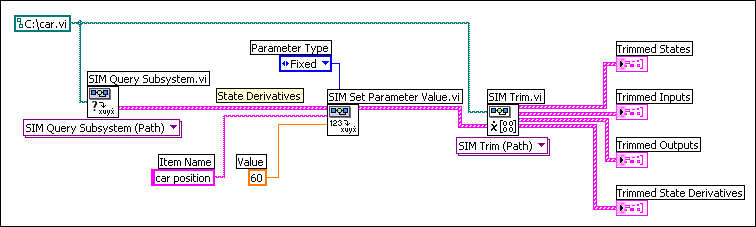
LabVIEW is a visual development language, right? That's why, many years ago, when I wrote the following about how to trim a nonlinear subsystem:
I also included a screenshot:
Many studies have been done that indicate users skim documentation, not actually reading if they can help it. I know that when I look for help in an application, I do the same thing. Enter some search terms, find a page, skim to find words I'm looking for, repeat the process if I don't find anything helpful.
Well the LabVIEW Help is not really conducive to this kind of skimming -- not when we're telling you how to complete long procedures, anyway. Here's a page from the LabVIEW 8.5 help about building shared libraries. How easy is it to follow that procedure? (I'm seriously asking, I've never followed it before ;-) My gut tells me the answer is "not very" because you have to mentally translate our words into objects you click or options you select. I think screenshots of dialog boxes, with the relevant options highlighted, would be much, much easier to skim, let alone follow.
Along similar lines, when we're talking about wiring several VIs together (like the example above) we should be showing you a minimum of one screenshot: what the finished block diagram should look like. You should be able to reconstruct the entire procedure just from using that screenshot without ever looking at the text. Maybe that's unrealistic, but you should be able to get close. Ideally we should embed all screenshots as VI snippets, as Phil points out in the comments below. Unfortunately the CHM format doesn't support dragging objects out of it, so we can't use snippets in the LabVIEW Help right now (which is kind of embarrassing, to be honest :-).
Similarly, for dialog-box heavy procedures like building a shared library, you should be able to skim our dialog box screenshots, see which options we highlight and what the settings are, and make your dialog boxes match.
The bottom line is that I feel the LabVIEW Help could use more screenshots. There are too many instances where we rely on text to describe operations can can be understood easier as screenshots. After all, we're a visual programming language, right? Yet we're not showcasing our best advantage in the help for the product itself.
As I write more LabVIEW documentation I am going to promote these ideas internally and see where they go. Maybe you'll see the results in a future version :-)
- Obtains the value of the State Derivatives parameter of the car model using the SIM Query Subsystem VI. The State Derivatives parameter contains car position, which is equivalent to the velocity of the car.
- Wires the State Derivatives parameter to the Parameters In input of the SIM Set Parameter Value VI. This VI sets the Value of car position to 60. The Parameter Type of car position is Fixed, which indicates this parameter is a condition that the SIM Trim VI must satisfy. This VI must return values of states and inputs that keep the velocity of the car at 60 mph.
- Wires the modified State Derivatives parameter to the State Derivatives input of the SIM Trim VI. This VI returns the Trimmed Inputs and Trimmed States parameters that the cruise-control system must use to maintain a velocity of 60 mph. This VI also returns the Trimmed Outputs and Trimmed State Derivatives parameters that the car model returns when the cruise-control system uses the values of the Trimmed States and Trimmed Inputs parameters.
I also included a screenshot:
Many studies have been done that indicate users skim documentation, not actually reading if they can help it. I know that when I look for help in an application, I do the same thing. Enter some search terms, find a page, skim to find words I'm looking for, repeat the process if I don't find anything helpful.
Well the LabVIEW Help is not really conducive to this kind of skimming -- not when we're telling you how to complete long procedures, anyway. Here's a page from the LabVIEW 8.5 help about building shared libraries. How easy is it to follow that procedure? (I'm seriously asking, I've never followed it before ;-) My gut tells me the answer is "not very" because you have to mentally translate our words into objects you click or options you select. I think screenshots of dialog boxes, with the relevant options highlighted, would be much, much easier to skim, let alone follow.
Along similar lines, when we're talking about wiring several VIs together (like the example above) we should be showing you a minimum of one screenshot: what the finished block diagram should look like. You should be able to reconstruct the entire procedure just from using that screenshot without ever looking at the text. Maybe that's unrealistic, but you should be able to get close. Ideally we should embed all screenshots as VI snippets, as Phil points out in the comments below. Unfortunately the CHM format doesn't support dragging objects out of it, so we can't use snippets in the LabVIEW Help right now (which is kind of embarrassing, to be honest :-).
Similarly, for dialog-box heavy procedures like building a shared library, you should be able to skim our dialog box screenshots, see which options we highlight and what the settings are, and make your dialog boxes match.
The bottom line is that I feel the LabVIEW Help could use more screenshots. There are too many instances where we rely on text to describe operations can can be understood easier as screenshots. After all, we're a visual programming language, right? Yet we're not showcasing our best advantage in the help for the product itself.
As I write more LabVIEW documentation I am going to promote these ideas internally and see where they go. Maybe you'll see the results in a future version :-)
Subscribe to:
Posts (Atom)