Showing posts with label labview help. Show all posts

February 16, 2010

Visual Help for Visual Code

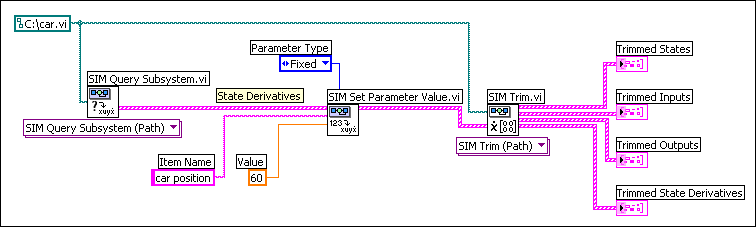
LabVIEW is a visual development language, right? That's why, many years ago, when I wrote the following about how to trim a nonlinear subsystem:

  1. Obtains the value of the State Derivatives parameter of the car model using the SIM Query Subsystem VI. The State Derivatives parameter contains car position, which is equivalent to the velocity of the car.
  2. Wires the State Derivatives parameter to the Parameters In input of the SIM Set Parameter Value VI. This VI sets the Value of car position to 60. The Parameter Type of car position is Fixed, which indicates this parameter is a condition that the SIM Trim VI must satisfy. This VI must return values of states and inputs that keep the velocity of the car at 60 mph.
  3. Wires the modified State Derivatives parameter to the State Derivatives input of the SIM Trim VI. This VI returns the Trimmed Inputs and Trimmed States parameters that the cruise-control system must use to maintain a velocity of 60 mph. This VI also returns the Trimmed Outputs and Trimmed State Derivatives parameters that the car model returns when the cruise-control system uses the values of the Trimmed States and Trimmed Inputs parameters.

I also included a screenshot:


Many studies have been done that indicate users skim documentation, not actually reading if they can help it. I know that when I look for help in an application, I do the same thing. Enter some search terms, find a page, skim to find words I'm looking for, repeat the process if I don't find anything helpful.

Well the LabVIEW Help is not really conducive to this kind of skimming -- not when we're telling you how to complete long procedures, anyway. Here's a page from the LabVIEW 8.5 help about building shared libraries. How easy is it to follow that procedure? (I'm seriously asking, I've never followed it before ;-) My gut tells me the answer is "not very" because you have to mentally translate our words into objects you click or options you select. I think screenshots of dialog boxes, with the relevant options highlighted, would be much, much easier to skim, let alone follow.

Along similar lines, when we're talking about wiring several VIs together (like the example above) we should be showing you a minimum of one screenshot: what the finished block diagram should look like. You should be able to reconstruct the entire procedure just from using that screenshot without ever looking at the text. Maybe that's unrealistic, but you should be able to get close.  Ideally we should embed all screenshots as VI snippets, as Phil points out in the comments below. Unfortunately the CHM format doesn't support dragging objects out of it, so we can't use snippets in the LabVIEW Help right now (which is kind of embarrassing, to be honest :-).

Similarly, for dialog-box heavy procedures like building a shared library, you should be able to skim our dialog box screenshots, see which options we highlight and what the settings are, and make your dialog boxes match.

The bottom line is that I feel the LabVIEW Help could use more screenshots. There are too many instances where we rely on text to describe operations can can be understood easier as screenshots. After all, we're a visual programming language, right? Yet we're not showcasing our best advantage in the help for the product itself.

As I write more LabVIEW documentation I am going to promote these ideas internally and see where they go. Maybe you'll see the results in a future version :-)

October 26, 2009

Interesting Articles

  • Here’s a review of the original Macintosh, done in 1984. It’s amazing to read this now with 25 years of perspective and realize both how different it was and how similarly things still work today. But even back then some people seemed to “get it”.

    When LabVIEW was first released in 1986, it was for the Mac, because that was the dominant graphical platform of the day, and LabVIEW is and has always been a graphical language. Makes sense to me. (We actually have a couple LabVIEW R&D members who’ve been around since version 1.0 – if you came to NIWeek in 2006, you saw them present onstage.) It wasn’t until 1992 that the first Windows version appeared.
  • Learn information better by getting it wrong first. This is an interesting idea, and it makes sense to me. Answers are always better when they come from within. Here in LV R&D we encourage tech writers to find answers to their problems (given the proper resources) before asking others for help. This often involves getting it wrong. But even outwardly, I employed this concept when I designed the Statechart Module Getting Started tutorial. How? I instructed users to build a broken statechart – and then try and run it. The idea is that the resulting error would serve as a sort of opposite-approach to good statechart design – e.g., here’s what not to do. It also gets users familiar with the error-reporting mechanism in the software and one of the key rules of statechart development.

    I guess the challenge is that if you fail too much it becomes frustrating and demotivating, so there’s a fine line to walk. We certainly don’t make a habit of publishing documentation that leads to failure :-)


August 3, 2009

The LabVIEW 2009 Help

In case you're wondering just what we do all day ... or all year ... the LabVIEW 2009 Help system is now available online. It contains the help for the LabVIEW Base/Full/Pro development systems as well as each individual module and toolkit.

Bet you didn't know we have so many LabVIEW add-ons! Did you know we make a toolkit to help you develop adaptive filter algorithms? (You know, like if you wanted to create some noise-cancellation headphones.) Or that we have software to help you validate your code with unit testing? And that's not even counting the add-ons that let you run LabVIEW in real time or on the Windows Mobile OS.

No, I swear I haven't joined the marketing team. I just think back to all the work we put into these help systems and feel really good seeing them online like this for public consumption :-)

Our online presentation is not the most sophisticated way to do things. You can see that we throw our stuff up there as static HTML pages. In this day and age of content management systems, having a collection of documents linked together just with hyperlinks seems pretty outdated. It's a travesty, I tells ya! Fortunately there are people at NI who realize this. I hope one day we can implement something a little more modern -- and that it won't be outdated if/when we roll that system out :-)